Compare home security systems: the best system vs your needs
This home security system comparison lets you pick up to three systems and weigh them on install type, contract terms, monitoring, and the hardware that actually determines how a system fits your home, not on which one paid for a better badge.
12 min read
Find your system
Tell us about your home, get a sized sensor estimate and a shortlist loaded into the table below.
All five systems at a glance
Click a column to sort. Rows reorder, nothing is scored or ranked.
| No. | Best for | |||
|---|---|---|---|---|
| 1 | SimpliSafe | DIY | No contract | Best value |
| 2 | Vivint | Professional | Contract required | Best smart-home integration |
| 3 | ADT | Professional | Contract required | Best professional install |
| 4 | Cove | DIY | No contract | Lowest-cost monitored option |
| 5 | Ring Alarm | DIY | No contract | Best for cameras |
Side-by-side comparison
Verified structural specs| Spec | |||
|---|---|---|---|
| Install type | |||
| Typical install time | |||
| Contract | |||
| Monitoring options | |||
| Cellular backup | |||
| Smart-home integration | |||
| Camera / doorbell lineup | |||
| Video storage (local vs. cloud) | |||
| Glass-break sensor | |||
| Water / freeze sensors | |||
| Equipment after cancelling | |||
| Verdict |
- Install type
- Typical install time
- Contract
- Monitoring options
- Cellular backup
- Smart-home integration
- Camera / doorbell lineup
- Video storage (local vs. cloud)
- Glass-break sensor
- Water / freeze sensors
- Equipment after cancelling
- Install type
- Typical install time
- Contract
- Monitoring options
- Cellular backup
- Smart-home integration
- Camera / doorbell lineup
- Video storage (local vs. cloud)
- Glass-break sensor
- Water / freeze sensors
- Equipment after cancelling
- Install type
- Typical install time
- Contract
- Monitoring options
- Cellular backup
- Smart-home integration
- Camera / doorbell lineup
- Video storage (local vs. cloud)
- Glass-break sensor
- Water / freeze sensors
- Equipment after cancelling
How to compare home security systems and find the best system vs the rest
A real home security system comparison has to go beyond a single "best overall" pick, because the best home security system for the price depends entirely on your own household. A renter and a homeowner with a larger property are rarely looking for the same thing, even when they're both comparing the exact same five systems.
Why we compare on structure, not star ratings
Most "best home security system" pages on the internet are built around a star rating that nobody can audit and an affiliate link under every entry. We built this page the other way around: every row in the table above is a verifiable structural fact about how a system works — not an opinion about which one is "best." Whether a system requires a signed contract, whether installation is DIY or scheduled, and whether a sensor exists at all are facts you can confirm directly with the provider before you commit a dollar. That's the whole point of this page: compare home security systems on what's actually verifiable, and the best home security system for the price falls out of that comparison on its own; it's never declared upfront.
Pricing is deliberately left out of the table. Security-system pricing changes often, varies by region, and is frequently bundled into limited-time promotions — publishing a specific number here would be stale within weeks. What doesn't change nearly as often is the structural shape of each offering: who installs it, what you're locked into, and what the hardware can actually do. That's what we track and update.
How to read each row
Install type: DIY vs. professional
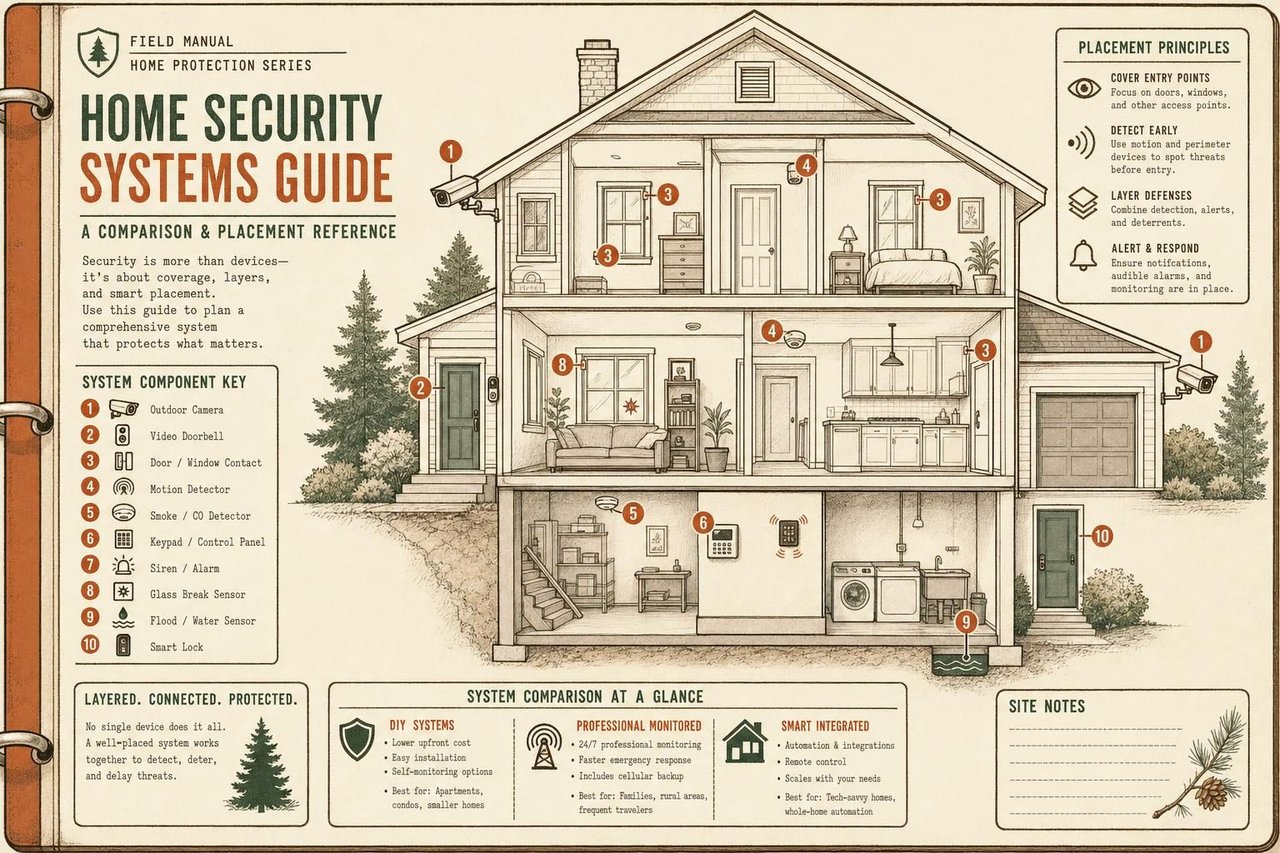
A DIY system ships as a kit you mount yourself: door/window sensors, a base station, and usually a keypad or app-based arm/disarm. It's the right fit if you're comfortable with a screwdriver and an afternoon, and it means you can take the system with you if you move, including out of a rental, where our renter-friendly security guide covers options that need no drilling at all. A professionally installed system is scheduled with a technician who wires and configures everything on-site. That typically costs more up front but removes any risk of a sensor being mounted wrong, and it's the more common choice for larger homes or households that would rather not DIY it.
Contract requirement
A contract-free system lets you cancel monitoring with no early-termination fee, which matters most if you're renting, testing the waters, or simply don't want to be locked in. A system that requires a contract term usually bundles the cost of professional installation and hardware into the monthly fee: read the cancellation terms before you sign, since the fee for breaking a multi-year contract early can be substantial.
Monitoring options
"Self-monitoring" means alerts go straight to your phone and you decide whether to call emergency services yourself. "Professional monitoring" routes alerts to a staffed monitoring center that can contact emergency services on your behalf, usually for an added monthly fee. Neither option is objectively better — a self-monitored system is cheaper and gives you full control, while professional monitoring means someone is watching even when your phone is off or out of signal.
Cellular backup
A system that relies purely on your home Wi-Fi goes dark the moment your internet does, which is exactly when a break-in or a storm is most likely to knock out power and Wi-Fi together. Cellular backup keeps the system connected to its monitoring service over the cell network even if your internet is down, and it's worth asking about specifically if you live somewhere with unreliable power or internet service.
Smart-home integration
This is about whether the security system talks to the rest of your smart home: locks, thermostats, garage-door controllers, voice assistants. A system with deep integration can do things like unlock the door for a dog walker on a schedule or drop the thermostat when you arm the system for the night. If you don't have (or don't want) a broader smart-home setup, this spec matters a lot less.
Camera and doorbell lineup
Some providers started as camera companies and still have the deepest lineup of indoor, outdoor, and video-doorbell hardware; others treat cameras as an add-on to a more traditional alarm system. If video is the main thing you want (seeing who's at the door, checking on a package), weight this row heavily.
Glass-break and environmental sensors
A glass-break sensor listens for the specific acoustic signature of a window breaking, which catches an entry method that a door/window contact sensor alone would miss. Water and freeze sensors aren't about intrusion at all. They alert you to a burst pipe or a flooding basement, which can be just as costly as a break-in if nobody's home to catch it early. Not sure how many sensors a specific home actually needs? Our sensor calculator sizes a brand-agnostic starting count from your own doors and windows.
Equipment after cancelling
With most DIY, contract-free systems, the hardware is yours outright: cancel the monitoring plan and keep using the sensors for local alerts, or take them with you if you move. With financed or contract-bundled hardware, ownership can depend on how the equipment was paid for; always confirm this in writing before you sign anything.
The five systems, in more detail
SimpliSafe: best value
SimpliSafe's core pitch hasn't changed in years and it still works: a DIY kit you can set up yourself in under an hour, no contract, and the option to add professional monitoring only if you want it. It's consistently named among the most affordable all-around options in independent comparison roundups, which makes it a reasonable default pick if you don't have a strong reason to choose something else.
Vivint: best smart-home integration
Vivint leans fully into professional installation and a tightly integrated smart-home ecosystem (smart locks, a thermostat, garage-door control) all run from one panel and app. If you're building (or already have) a broader smart-home setup and want security to be one piece of that system, not a separate app, Vivint is the one built for that.
ADT: best professional install
ADT has the longest track record and the widest professional-installer network of any provider on this list, which matters if you want a local technician you can call and a company that will almost certainly still exist in ten years. It typically comes with a contract, so weigh that against the value of a fully professional setup and support network.
Cove: lowest-cost monitored option
Cove is the quieter name on this list, but it shows up repeatedly in independent roundups as the lowest-cost way to get professionally monitored protection without signing a contract. It's a DIY kit in the SimpliSafe mold, with a smaller hardware catalog and less smart-home depth, which is a fair trade for the price if your main goal is "monitored, not fancy."
Ring Alarm: best for cameras
Ring built its name on video doorbells and cameras before it ever sold an alarm panel, and that shows: the camera and doorbell lineup here is the deepest of the five, and the whole system is built to be expanded piece by piece (add a camera this month, a sensor next month), not bought as one bundle on day one.
How to choose, by household (best system vs your actual situation)
- Renting or testing the idea: prioritize no-contract, DIY systems (SimpliSafe, Cove, or Ring Alarm) so you can take the hardware with you or cancel without a fee.
- Already have a smart home: Vivint's integration depth is hard to match if locks, a thermostat, and a garage controller are all part of the plan.
- Want a local technician and an established network: ADT's professional install and monitoring footprint is the widest of the five.
- Cameras and video are the main priority: Ring Alarm's doorbell and camera lineup is the deepest, and it's the easiest system here to grow incrementally.
- Budget is the deciding factor and you still want professional monitoring: Cove is the one most often cited as the lowest-cost monitored option.
If none of these match your situation exactly, that's exactly what this comparison tool is for: re-run it with your own two or three finalists instead of relying on someone else's household to stand in for yours when you compare home security systems this closely.
Understanding total cost, without trusting a single advertised number
Every system on this page is sold with at least four separate cost components: equipment (the sensors, cameras and base station themselves), an installation fee (sometimes waived as a promotion, sometimes not), a recurring monitoring fee, and (for contract-based systems) an early-termination fee if you cancel before the term ends. Advertised pricing almost always leads with the lowest of these four numbers, usually the discounted equipment cost or an introductory monitoring rate, which is exactly why we don't reproduce a specific price here: the number that matters is the one you'll actually pay in month six, not the one in the ad.
The practical way to compare real cost across providers is to ask each one the same three questions directly: what is the equipment cost after any current promotion ends, what is the standard (non-introductory) monthly monitoring fee, and what happens financially if you need to cancel in month three. A provider that can't answer the third question clearly is telling you something useful on its own.
When you compare home security systems this way (system vs system, question by question), the real cost differences surface fast, usually well before you've finished the third provider. It's a far more useful comparison than best vs worst marketing claims from either company's own site.
Questions worth asking before you sign anything
- "What's the monitoring fee after the introductory period?" Promotional rates are common and often not disclosed unless asked directly.
- "If I cancel in month three, what do I owe?" The honest answer to this question tells you more about a contract's real terms than its advertised length.
- "Is the equipment mine if I cancel, or does it need to be returned?" This varies by financing arrangement even within a single provider's plans.
- "Does the base monitoring plan include cellular backup, or is that a separate add-on?" This is one of the most commonly assumed-but-not-included features.
- "What's the actual response time for a triggered alarm, measured, not advertised?" Ask for a number tied to an independent test if the provider has one, not a marketing claim.
Red flags worth taking seriously
A few patterns show up often enough across security-system sales conversations that they're worth naming directly. A salesperson who won't give you the post-promotional monitoring fee in writing is one. Pressure to sign the same day, especially paired with a "this price expires tonight" framing, is another — legitimate providers in this space don't need same-day urgency tactics, and a system you can research for a week is the same system whether you sign today or next week. A quote that requires a home visit before any pricing is disclosed at all is also worth treating with extra scrutiny, since it removes your ability to compare offers before someone is already in your home.
What a professional installation visit actually involves
For Vivint and ADT, the installation appointment typically runs one to three hours depending on home size and how many sensors are being placed. The technician will walk the home with you to place door and window sensors, mount any cameras, set up the central panel, and walk you through the app before leaving. It's reasonable to ask for a specific sensor placement plan in advance for any entry point you're particularly concerned about (a side door, a ground-floor window facing a secluded yard). Don't leave every placement decision to the installer's default pattern.